beginner, customization, elisp, navigation, opinion, productivity, workflow
Searching in Buffers with Occur Mode
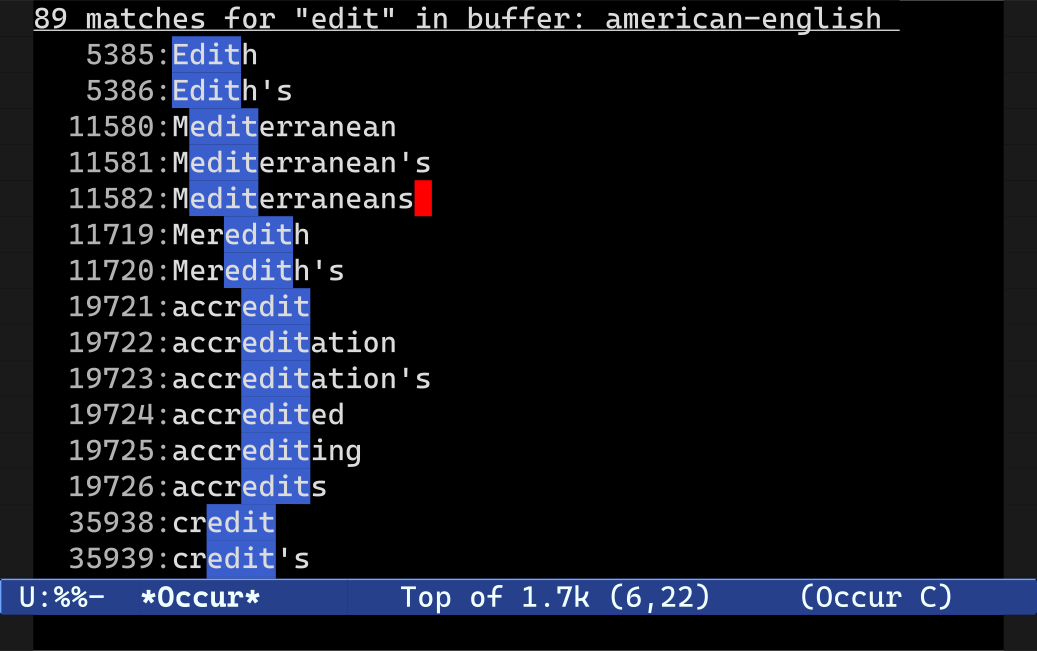
The Emacs M-x occur (also bound to M-s o) command is a useful replacement for GNU grep, when your only requirement is searching open buffers in Emacs. Like grep, the occur command will take a regular expression and print, in a separate buffer, all the lines that match the expression. One really nifty thing about occur is that it will preserve the faces (the colors, or syntax highlighting, if you will) in the displayed matches.
The default command, M-x occur, will only search the active buffer, but its cousins M-x multi-occur and M-x multi-occur-in-matching-buffers will search the buffers you specify, or all buffers that match a given regexp pattern, respectively.
There’s a few helper commands that will make your life easier, such as occur-rename-buffer that renames an *Occur* output buffer so it includes the names of the buffers it searched. Useful if you want to search for different things. This command is also bound to r in the *Occur* buffer itself.
You can also re-run the occur command by pressing g in the output buffer. (Note: this is actually a standard, of sorts, used by most interactive buffers including dired, compile and grep.)
Another useful feature is its support for the compilation mode commands next/previous-error (M-g M-n and M-g M-p respectively), as they enable you to cycle through the list of occur matches from within the source buffer itself.
In a similar vein, you can enable follow mode in the *Occur* buffer by pressing C-c C-f, and future calls to M-n and M-p in the *Occur* buffer will automatically jump to the correct match in the source buffer.
Making Occur a little more useful
My only complaint about occur is that it does not let you quickly search a set of buffers that match a specific major mode — arguably a common use case if you’re a programmer. The code seen below will search all open buffers that share the same mode as the active buffer.
(eval-when-compile (require 'cl)) (defun get-buffers-matching-mode (mode) "Returns a list of buffers where their major-mode is equal to MODE" (let ((buffer-mode-matches '())) (dolist (buf (buffer-list)) (with-current-buffer buf (if (eq mode major-mode) (add-to-list 'buffer-mode-matches buf)))) buffer-mode-matches)) (defun multi-occur-in-this-mode () "Show all lines matching REGEXP in buffers with this major mode." (interactive) (multi-occur (get-buffers-matching-mode major-mode) (car (occur-read-primary-args)))) ;; global key for `multi-occur-in-this-mode' - you should change this. (global-set-key (kbd "C-<f2>") 'multi-occur-in-this-mode)
From → All Articles, For Beginners, Tutorials
Mastering Emacs
Very useful indeed. Thanks!
I would like to add that you can start occur from isearch. This is quite a common use case: you start searching for something in the current buffer and only then realize that you get too many hits, so that paging through the results with isearch becomes cumbersome. M-s o is also bound in the isearch-mode-map and will start occur with the current search term.
Now I’ll go and write a function that starts multi-occur-in-this-mode from occur.
Here it is:
(defun occur-multi-occur () "Starts multi-occur for the current search term on all buffers with the first matching buffer's major mode." (interactive) (multi-occur (get-buffers-matching-mode (with-current-buffer (car (nth 2 occur-revert-arguments)) major-mode)) (car occur-revert-arguments))) (define-key occur-mode-map "m" 'occur-multi-occur)Instead of using M-s o, I find it easier to use C-o which can be accomplished with this piece of code:
(define-key isearch-mode-map (kbd "C-o") (lambda () (interactive) (let ((case-fold-search isearch-case-fold-search)) (occur (if isearch-regexp isearch-string (regexp-quote isearch-string))))))I think I found it in technomancy’s emacs start kit and I use it all the time.
I used that code for a long time, too, but it’s now much easier. If you prefer C-o as a key binding, you could strip that down to:
I think the default functionality provided by
C-ois too useful to be overriden. A better choice might be the less usefulM-oface stuff.mickey: I don’t understand what functionality you’re referring to.
If you’re talking about the
then that functionality is still preserved since the code given by Anselm (thanks for the tip btw, I didn’t knew isearch provided that function in a easy to use wrapper) since it only binds the
combination when you are already inside a search.
I just tried in my emacs (with the
flag) and
doesn’t seem to do anything while searching, except to quit the search and call
.
Do you have anything else bind to
in the
? Because I’m always on the lookout for things others find “too useful” in emacs.
What I want is a standard, consistent, robust way of editing matching lines in place in the *occur* buffer and saving them, and/or some non-interactive global regex search and replace in buffers/files matching a regex/mode. I recently found that `grep-ed’ fails (silently) with TRAMP /sudo: files. I’m trying `wgrep’ now instead, but I only found that by accident a day after I gave up googling and searching emacswiki for a replacement.
I really love that idea for both occur and grep (I used wdired all the time), and it looks like Emacs 24 will provide on the occur front at least, and might be generalised to deal with the grep case as well: bug#8463: 24.0.50; [PATCH] Direct Edit in *Occur* Buffer.
Yeah I remember reading about that a while back. I hope it makes it in in emacs 24, but we’ll see. I think extending the concept of indirect buffers (which is a buffer that “points” to all of, or a portion of, the text in another buffer) so multiple buffers can be referenced from one “master” buffer would be a cleaner way of solving this problem generally.
The package manager in Emacs 24 (M-x list packages) comes with all-mode which I think is what you’re looking for.
What I meant was the package manager offers a package “all” which you have to install. Load it with M-x all-mode and use the command “all” like you would “occur”.
Thanks for this. I don’t use
occurlike I should. I reach forgrepat the command line instead. Time to change that! I just need to drill it into my fingers now.get-buffers-matching-modecould be written in a functional style like this:(require 'cl) (defun get-buffers-matching-mode (mode) "Returns a list of buffers whose major-mode is equal to MODE." (remove-if-not #'(lambda (buf) (with-current-buffer buf (eq mode major-mode))) (buffer-list)))The functionality is the same; it’s just another way of approaching the problem.
As an aside, I really like the look of your blog. The choice of fonts in particular is very classy, IMO. Is it all part of the theme?
Aankhen: There are still plenty of good reasons to use grep, but for goodness sakes do that within Emacs as well! I find that M-x rgrep in particular gets heavy usage.
Phil: Yes, I try to remember to use it within Emacs. I forget more often than not.
mickey: Yup, I’m seeing Constantia and Consolas here. Huge fan of the latter, heh.
Hi Aankhen, thanks for the suggestion! That’s why I love Emacs: there’s more than one way to skin a cat.
Mickey.
I think so; but the font is entirely dependent on your operating systems’ fonts, so you may well see a different one entirely
I seem to recall changing them to Microsoft’s “new” font series (Consolas, Constantia, etc.) as I use them on both windows and linux.
“My only complaint about occur is that it does not let you quickly search a set of buffers that match a specific major mode — arguably a common use case if you’re a programmer”
To do this, I first use ibuffer to select/filter the buffers I’m interested in, then run occur directly from the *ibuffer* buffer using the ‘O’ key binding.
I notice you’re a fan of using setq to add to customizable variables.
Why not M-x customize-group or M-x customize-variable the variables.
That way people could get in the habit of working with, instead of against the customize interface.
What do you think?